- handbook
- Company
- Company
- Board & Investors
- Communications
- Decision making and project management
- Guides
- Organizational Structure
- principles
- Remote Work
- Security
- Access Control Policy
- AI Development and Customer Data Policy
- Asset Management Policy
- Business Continuity & Disaster Recovery Policy
- Cryptography Policy
- Data Management Policy
- Hardware Security Policy
- Human Resources Security Policy
- Incident Response Plan
- Information Security Policy and Acceptable Use Policy
- Information Security Roles and Responsibilities
- Operations Security Policy
- Risk Management Policy
- Secure Development Policy
- Third-Party Risk Management Policy
- strategy
- values
- Operations
- Engineering & Design Practices
- Design
- Engineering
- Contributing
- Dependency Updates
- Front End
- Packaging Guidelines
- Platform Ops
- Deployment
- FlowFuse Dedicated
- Incident Response
- Observability
- Production Environment
- Self Hosted Assistant
- Staging Environment
- Update Stacks on Production
- Product
- Blueprints
- Feature Catalog
- Feedback
- Glossary
- Market Segments
- Metrics
- Node-RED Dashboard
- Personas
- Pricing Principles
- Principles
- Product Growth
- Product Swimlanes
- Strategy
- Versioning
- vision
- Project Management
- Releases
- Security Policy
- Support
- tools
- Internal Operations
- People Ops
- Coaching Plans
- Code of Conduct
- Compensation
- Compliance & Regulatory
- Expenses
- Hiring
- Holiday & Leave
- Job Descriptions
- Account Executive
- CEO
- Chief of Staff
- CTO
- Developer Relations Advocate
- Engineering Manager
- Fullstack Engineer
- Fullstack Engineer (AI-Focused)
- Head of Marketing
- Product Manager
- Product Marketer
- Solutions Engineer
- Technical Product Manager
- VP of Sales
- PeopleOps Policies
- Performance review
- Summit
- Travel
- Marketing department
- Marketing
- blog
- Brand Voice
- Community
- Company Messaging
- Customer Stories
- Events
- FlowFuse for Education
- How we work
- Lead Activation
- Lead Generation
- Marketing Programs
- Social Media
- Webinars
- Website
- Sales department
- Sales
- Commercial Organization
- Customer Success
- Edge Connectivity Sales Process
- Engagements & Pricing
- Forecast Review
- Hubspot
- Legal
- operating-principles
- Partnerships
- Processes
- Professional Services
- Sales Compensation Plan
- Sales Meetings
- Sales Regions
- Self Hosted Dashboard v2 Multi User
- Subscription Agreement 1.5
Certified Nodes
FlowFuse maintains a catalogue of nodes from the community that we put through regular checks to ensure they are of high quality and standards for use by our customers.
The catalogue is maintained in the certified-nr-nodes(🔒) repository.
A daily GH action runs the audit process across all nodes and regenerates the catalogue.json file served to Node-RED
instances within FlowFuse.
Proposing a new node to be included
- Raise an issue(🔒) with details of the node to be added.
- Assign the issue to the CTO (or in his absence, another member of the Engineering Team).
Adding a new node to the list
Full details on the technical process are provided in the certified-nr-nodes(🔒) readme.
- Perform due diligence on the module; how popular is it, is it well maintained, is there a backlog of open issues etc.
- Add the module to the list held in
modules.json - Run the audit locally to check the current state of the module. Review the results and assess whether we can accept it into the catalogue in its current state.
- Raise a PR with the updated module list and audit output for the module.
- Review the PR with the CTO/Engineering Team
Generating Tokens for Access to Certified Nodes Registry
Licensed Self Hosting customers can request acces to the Certified Nodes registry via support. These are the steps to generate a token for them
- On FlowFuse Cloud in the FlowFuse Team, locate the
ff-certified-nodesinstance in theInternal ToolsApplication - Open the editor and locate the function node in the
Authenticationtab - The comments at the top of the tab explain how to generate a token using the customer name and a randomly generated password (recomend using the
pwgencommand to create random password) - Add the username, password and token (as comment) to the
tokensobject in the function node - Provide the token to the customer to add in the
Admin Settings->Flowfuse Nodessection in their Forge instance
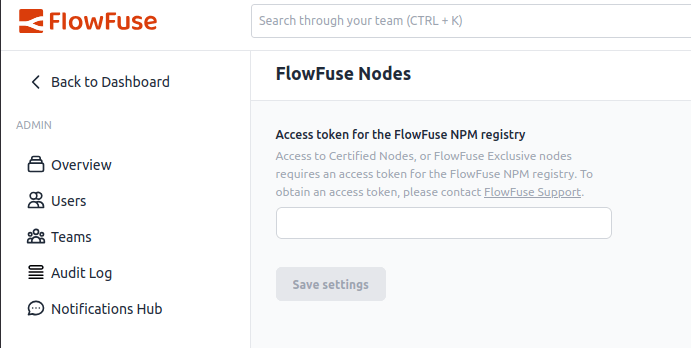
Table of Contents
Page maintainer
CEO
Updated: 7 May, 2026