FlowFuse 2.30: Expert Builds Your Industrial Application
Describe the OEE dashboard, MES handover screen, or UNS topic mapping you need, and FlowFuse Expert builds it on your workspace. Plus a more immersive editor optimized for iterating with Expert.
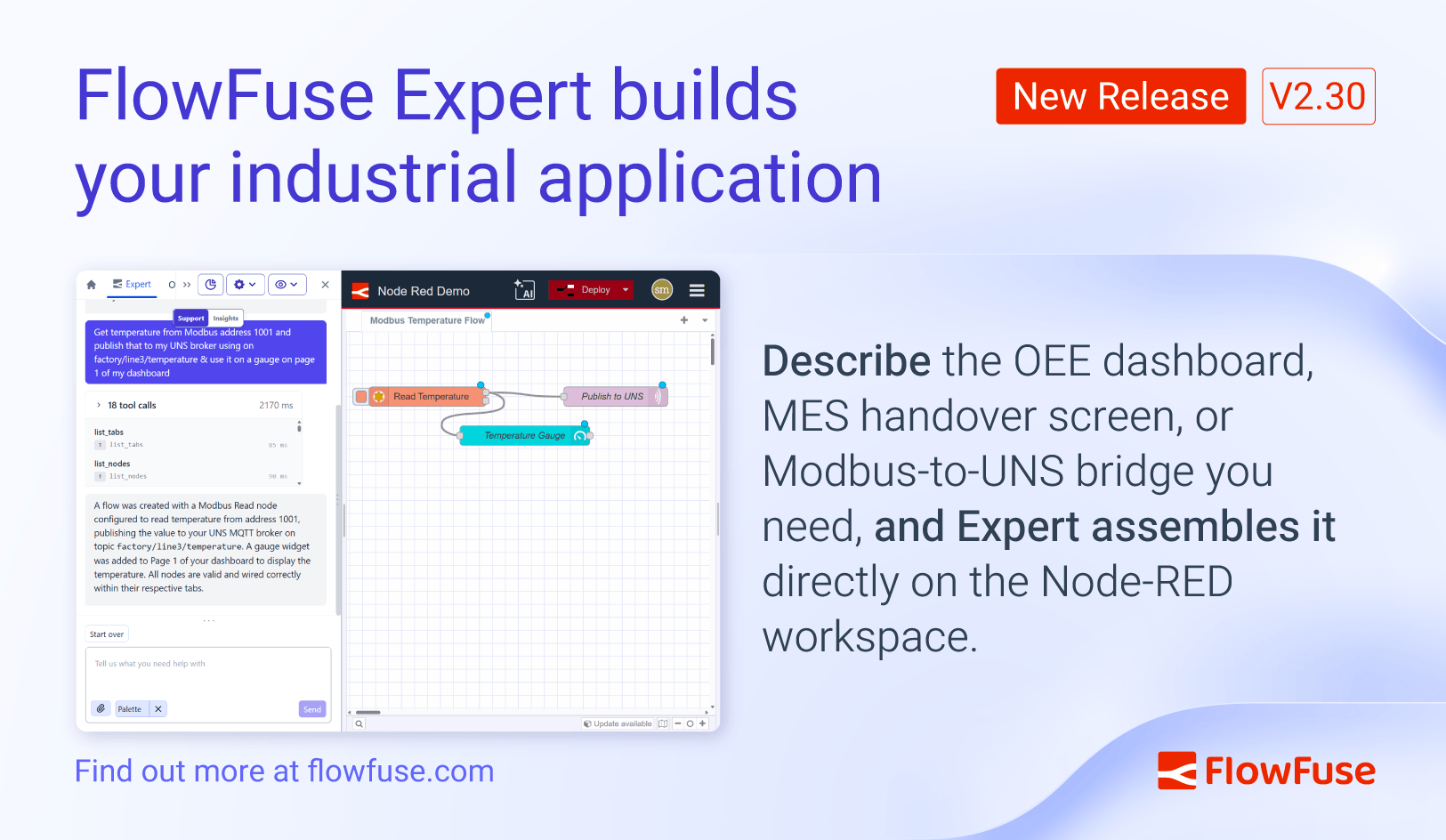
FlowFuse 2.30 lets FlowFuse Expert build industrial applications for you from a description. Tell Expert what you need, and it assembles it on your workspace.
FlowFuse Expert Builds Your Industrial Application
FlowFuse Expert is our integrated AI assistant across FlowFuse's website, platform, and in the immersive Node-RED editor.
Until now, Expert could surface information, suggest changes, and act on links you clicked. Translating those suggestions into a working OEE dashboard, MES handover screen, or Modbus-to-UNS bridge still meant placing every node and wire by hand.
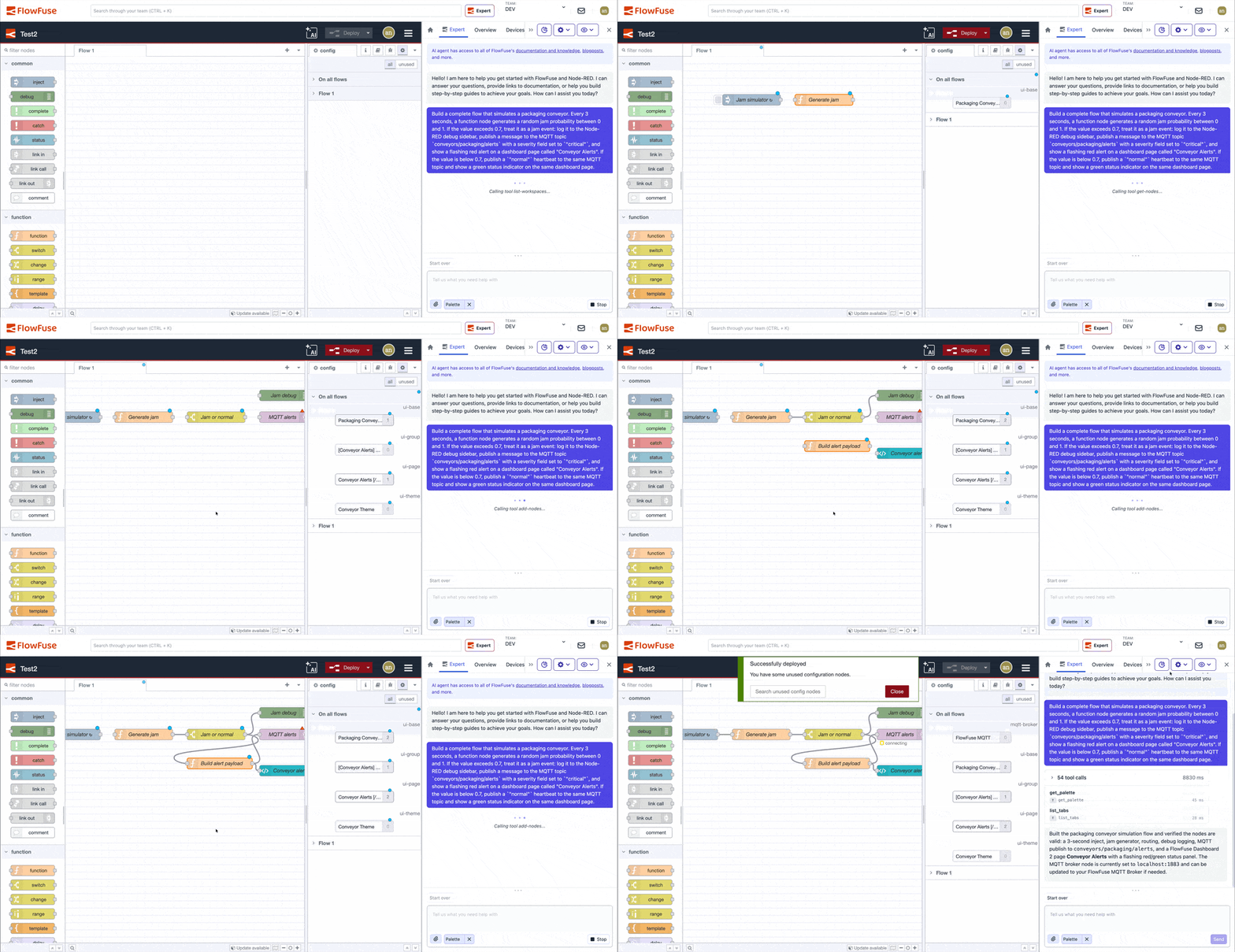
Now you can describe what you want to build and the FlowFuse Expert builds it for you directly on the Node-RED workspace saving you time. Real-time tool-call status keeps you in the loop while it works, and you keep iterating in chat to refine what it produced so it maps correctly to your real life scenario.
Examples to try:
- "An OEE dashboard for line 3 with downtime reasons and a daily target"
- "Get temperature from Modbus address 1001 and publish that to my UNS broker on factory/line3/temperature"
- "A shift handover screen showing outstanding alarms and recent operator notes"
- "An asset utilization dashboard for the packaging cell, refreshed every minute"
Availability
Agentic Node-RED development is being soft launched to create a window of opportunity to fine tune the experience in order to scale right after. Right now it is available on FlowFuse Cloud Starter, Team, and Enterprise on request. Self-hosted enablement follows shortly.
Contact us to let us enable Agentic Node-RED development for your FlowFuse Cloud team.
Coming next: self-hosted enablement, plus we are exploring "bring your own key" so teams can point Expert at their own AI provider.
In practice
- You go from a description to a working OEE dashboard, Modbus integration, or handover screen without needing to place each node by hand
- You see Expert's progress in real time as it builds, rather than waiting on a wall of suggestions to apply manually
- You iterate by talking, in addition to being able to control everything by hand through the workspace
What else is new?
A smoother iteration experience with Expert
We refined the immersive editor experience so working with FlowFuse Expert feels more natural and with less context switching. Platform controls like snapshots, environment variables, and instance settings now stay accessible alongside the workspace instead of covering your workspace.
More usable snapshot comparisons
We continued refining the snapshot comparison experience introduced in 2.29 to make reviewing changes faster and less noisy. Position-only changes can be hidden, computed values no longer appear as modified, and the diff viewer now makes it easier to identify the type of node affected at a glance.
Smaller updates and fixes
- Markdown code blocks in Expert preserve line breaks again: a regression from the 2.29 highlighting work is fixed.
- Device editor auto-recovery: when opening the editor on a remote instance fails on first load, the page now refreshes after three seconds rather than leaving you on a 502.
- Force all users to use SSO: admins can now redirect every login to a single configured SSO provider, removing the email and password fallback for organisations that need to enforce SSO across the org (Enterprise self-hosted).
- Tooltip cleanup: native
titlereplaces the buggy custom directive. Less flicker, fewer stuck tooltips. - Suspended team logging: when a billing failure or trial expiry leaves an instance running, we now log why so support can act faster.
- Device palette settings: saving palette changes on a device no longer accidentally sends sanitised security flags upstream.
- Git integration feature flag:
gitIntegrationrespects the all-feature override (Azure DevOps users on edge configurations). - Expert chat request timeout: front-end chat requests time out cleanly rather than hanging.
- Audit log stop reasons: stop events show the underlying reason in the audit log detail rather than a generic message.
Looking ahead: we're actively preparing support for Node-RED 5.0 in FlowFuse and currently expect it to become available as a stack option by the end of May. Until then, Node-RED 4.1 remains the default.
For detailed breakdowns of each feature with additional visuals, visit our changelog. For the complete list of everything included in FlowFuse 2.30, check out the release notes.
If something in this release improves your workflow, or if there is still friction we can remove, please share feedback or report issues regarding this release to us.
Get FlowFuse Expert Application Building enabled for your team
Application Building is in soft launch on FlowFuse Cloud Starter, Team, and Enterprise. Request access to enable it for your team.
Related Articles:
- FlowFuse 2.29: FlowFuse Expert Comes to Self-Hosted Enterprise
- FlowFuse 2.28: Troubleshoot Faster, Manage Edge Devices Centrally, and More Self-Hosted Flexibility
- FlowFuse 2.27: Integrated Editor in Remote Instances & Context-Aware FlowFuse Expert
- FlowFuse 2.26: Bringing access-controls to your MCP nodes
- FlowFuse 2.25: Interacting with MCP Resources in FlowFuse Expert, Improved Update Scheduling, and lots of UI improvements!